Routing network traffic through two different NICs
First published January 3, 2026 • Last modified on July 26, 2026 • 1 min read • 190 words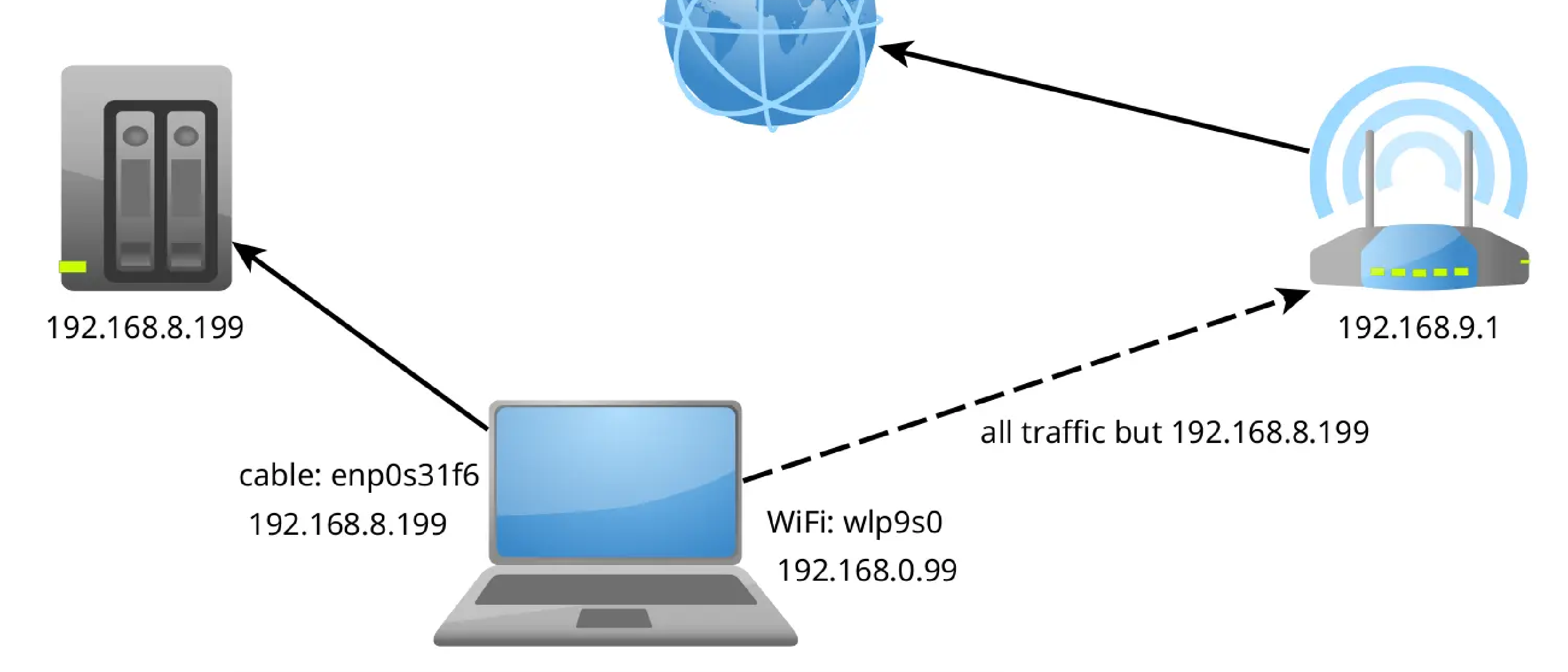
I am just copying a lot of files from our NAS-Backup do my laptop. Since the WiFi was too slow (1 TB takes a few hours in the real world), I connected the NAS directly to my laptop with an ethernet cable. Both machines needed to setup their IP address manually within the same network (which can be whatever; I used 192.168.8.150 for my laptop and 192.168.8.199 for the NAS, and Netmask for both 255.255.0.0). Since this “internal” network does not provide internet access, my Ubuntu 24.04 laptop fell automatically back to WiFi. To force the laptop to use the wired network, I needed to deactivate WiFi. But now I cannot get online without WiFi. So I needed to tell the computer to use the wired network only for the NAS which has the IP 192.168.8.199. The command I needed is:
sudo ip route add 192.168.8.199 dev enp0s31f6This is a quick hack and the route will disappear after a reboot. The enp0s31f6 is the network interface name that connects to the “internal” network. You can figure out the names of your network interfaces with the command ifconfig or ip link.